
GIS4Ag PowerZoner™
You've walked those fields. You know what the data should show.
Stop outsourcing your expertise - build the zones yourself.
PowerZoner
See what you've always suspected - hilltops and depressions finally separated. Satellite zones refined by terrain & wetness.

TerraZoner
Maps that match what you see walking the field. Pure terrain-driven zones for VR seeding, spraying, and fertility.
Your Agronomy, Amplified
Great zones come from great agronomists - not expensive subscriptions or service providers. These tools let you apply what you know, test different approaches, and refine until the map matches reality. No per-acre fees. No waiting. No outsourcing. You are in control.

See What You've Always Known
You've scouted these fields. You know that hilltop and that low spot need different treatment - even though they both show up as "low productivity" in standard NDVI. PowerZoner finally separates them. Zones that match your instincts.
Zones That Finally Make Sense
You've always known that hilltop and that wet corner need completely different management - even though both show up "red" on standard maps. PowerZoner uses LiDAR or SAR-based moisture data to split low productivity into wet-limited and dry-limited areas. Now your prescriptions can reflect what you've seen for years.
How It Works
Load Field Boundary

Import your field boundaries in standard shapefile format. Works with boundaries from any GIS software or precision ag platform.
Fetch Multi-Year Satellite Data

Fetch peak biomass NDVI from Sentinel-2 back to 2015. Preview each year, select which seasons to include, remove drought or hail years.
Generate Management Zones

Create 2-10 productivity zones using a Crop Productivity Index (CPI) derived from multi-year NDVI analysis.
Advanced Classification

Fine-tune zone boundaries with multiple classification algorithms. Adjust parameters to match local conditions.
Topo-Refined Zones with Wetness Index
You've seen it a hundred times: that "low productivity" zone lumps drought-prone hilltops with waterlogged depressions. Everyone knows these aren't the same agronomically. NDVI can't tell the difference - but terrain can. PowerZoner uses LiDAR-derived wetness indices to split these apart, so your low zones actually mean something when you're writing rates.
SAR Wetness Alternative

Where LiDAR isn't available, split low zones into wet and dry based on Synthetic Aperture Radar (SAR) soil moisture captured during spring thaw and post-harvest. Available globally.
3D Terrain Viewer
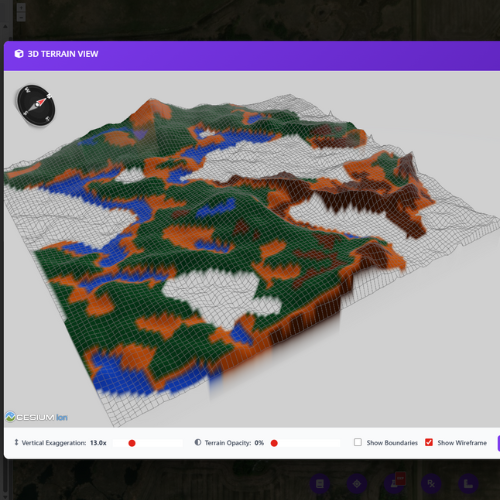
Visualize zones draped over true 3D terrain models. Validate zone boundaries against actual landscape features.

Maps That Match How The Field Looks
Take advantage of free high-resolution LiDAR data covering most of the US and expanding across Canada. Where LiDAR isn't available, import your own RTK or drone elevation data. Ridges, slopes, and depressions mapped exactly as you'd draw them yourself.
Trust Your Terrain Knowledge
You can spot a knoll or depression from the cab. Now get zones that match. TerraZoner maps where water will be scarce or excessive based purely on terrain - no yield data history needed, no waiting on satellite passes. Just landscape truth that supports your VR seeding decisions.
How It Works
Import Field Boundary
Load your field boundaries in shapefile format from any GIS software or precision agriculture platform.
Automatic LiDAR Download
TerraZoner automatically fetches high-resolution LiDAR elevation data. Extensive US and expanding Canadian coverage.
TPI & Wetness Zones
Generate 2-10 zones based on terrain position and moisture potential. Identify ridges, slopes, flats, and depressions.
Advanced Terrain Classification
Fine-tune topography-based zones with advanced classification parameters. Adjust TPI window sizes and wetness thresholds.
Interactive 3D Validation
See your zones draped over a true 3D terrain model. Rotate, zoom, and validate alignment with landscape features.
Bring Your Own Elevation
Where LiDAR isn't available, upload your own elevation data: RTK point shapefiles, drone LiDAR GeoTIFFs, or other sources.

Your Instincts, Mapped
You know where to sample - the tools just remember. Place points exactly where your experience tells you, then navigate to those same spots year after year. No algorithm picks better than an agronomist who knows the field.
Zone-Based Soil Sampling Tool
Place sampling points exactly where your agronomic instincts tell you - within each zone, guided by your field knowledge. Save locations and navigate to the same GPS coordinates year after year for consistent, repeatable sampling. Works with zones from either PowerZoner or TerraZoner.
Shapefile Export
Export zones as industry-standard shapefiles compatible with all precision ag platforms, farm management software, and equipment.
VR Prescription Generator
Convert zones into variable rate prescriptions. Set seeding rates, fertilizer rates, or any input by zone for direct equipment loading.
Multiple Export Formats
Beyond shapefiles, export to GeoTIFF, KMZ for Google Earth, and PDF map layouts for reports and client presentations.
Unlimited Zone Creation
No per-field or per-acre fees. Create zones for unlimited fields across your entire client base with a single annual subscription.
Video Tutorials & Manual
Comprehensive training resources including step-by-step video tutorials and detailed user manuals for both PowerZoner and TerraZoner.
Topo-Refined Zones Where LiDAR Exists. SAR* Everywhere.
PowerZoner works everywhere. LiDAR enables automatic topo-refined zones where available. Where LiDAR isn't available, use Synthetic Aperture Radar (SAR) moisture data—available globally—or upload your own RTK elevation data. TerraZoner works where LiDAR is shown on these maps, or anywhere with uploaded RTK data.
CA In Canada? Check Your Coverage
Virtually complete LiDAR coverage across Ontario. Complete coverage in southern Manitoba, with expanding coverage in Saskatchewan and Alberta. Where LiDAR exists, PowerZoner automatically creates topo-refined zones. No LiDAR? Use SAR moisture data (available globally) or upload RTK elevation data.
Use the map above to check LiDAR availability. Areas with visible hillshade have auto topo-refined zones available.
✓ Get StartedUS In the USA? Check Your Coverage
Nearly all major agricultural regions have LiDAR for auto topo-refined zones. From the Red River Valley to Iowa's rolling hills, Illinois to Nebraska—green overlay means LiDAR available. No LiDAR? Use SAR moisture data (available globally) or upload RTK elevation data.
Use the map above to check LiDAR availability. Green overlay = auto topo-refined zones. Transparent = use SAR moisture or upload RTK elevations.
✓ Get Started*SAR is experimental and may not work as intended in all situations, particularly where there may be standing water at certain times of the season.
Start Creating Better Zones
Join precision agronomists using PowerZoner to create professional management zones with full control over classification and zone refinement. If your agronomist isn't using PowerZoner, send them to this page! Sign up now for instant access.
Annual Subscription
per year
- Unlimited fields & zones
- All features included
- Video tutorials & user manual
- Instant access after signup
By signing up, you acknowledge that you have reviewed and agree to comply with the PowerZoner licensing terms.
Professional Tool Notice
PowerZoner is designed for professional agronomists, agrologists, and crop consultants to create satellite-based management zones from multi-year NDVI data. While PowerZoner provides tools for creating prescription files and analyzing crop variability, it does not provide agronomic advice, interpretation, or recommendations regarding seeding rates, input application strategies, or any other agronomic decision-making. Users are expected to possess the professional expertise necessary to determine appropriate input rates, interpret zone maps, and apply them appropriately within their agronomic practice.
Signup Now for Instant Access - Make Your First Zones in Minutes
Multi-Year NDVI Analysis
Automatic processing of satellite imagery data
Unlimited Fields
Create zones for as many fields as you need
Full Control
Advanced classification and refinement tools
One Price. Unlimited Zones.
No per-acre fees. No waiting on a third party. With PowerZoner, you're in control - create professional management zones instantly for every field you manage.
- Send data, wait for results
- Limited control over output
- Costs scale with acreage
- 10,000 ac = $10-30K+/yr
- Create zones instantly
- Full control over every zone
- Unlimited fields & acreage
- TerraZoner included
PowerZoner
- Multi-Year Satellite NDVI Zones
- TerraZoner Included - LiDAR Terrain Zones
- Unlimited Fields & Zone Creation
- VR Prescription Generator
- Zone-Based Soil Sampling Tool
- All Export Formats (SHP, GeoTIFF, KMZ, PDF)
- Video Tutorials & Documentation
Cost Comparison
See how much you'd spend outsourcing zones
Take Control of Your Zone Creation
Join agronomists creating professional zones on their own terms.
See PowerZoner in Action
Watch these step-by-step video tutorials to learn how PowerZoner works. Each video demonstrates a key feature or workflow, from importing field boundaries to exporting finished management zones.
View Complete User ManualIntroduction to PowerZoner
Get an overview of PowerZoner's capabilities and interface. Learn what makes it the most advanced satellite-based management zone tool available today.
Import Field Boundary & Fetch Satellite Data
Learn how to import your field boundary shapefile and automatically fetch multi-year peak NDVI satellite data from Copernicus Sentinel-2.
Select Suitable Years for Composite Layer
Choose which years to include in your multi-year composite analysis. Select years with representative crop performance to create robust productivity zones.
Standard CPI-Based Zone Creation
Generate management zones from your composite layer using the Crop Productivity Index (CPI) method. Choose from 2 to 10 zones with advanced classification controls.
Create Topo-Refined Low Productivity Zones
Refine your low productivity zones using topographic analysis. Identify wet depressions, slopes, and other terrain features that impact crop performance.
Using SAR to Define Wetness (Experimental)
Where LiDAR isn't available, use Synthetic Aperture Radar (SAR) soil moisture data to split low productivity zones into wet and dry areas. SAR data is available globally from spring and post-harvest periods.
Zone Editing - Reassign Zone Blobs
Take full control of your zones with the blob reassignment tool. Select any group of pixels belonging to one zone and reassign them to another zone when the data doesn't match what you know from scouting the field.
Import Shapefile Elevation (No LiDAR Areas)
For locations without LiDAR coverage, import your own elevation data as a shapefile to enable topographic refinement features.
Export Zones as Shapefile
Export your finished management zones as shapefiles for use in precision agriculture software, GIS applications, or variable rate equipment.
Soil Sampling Tool Demo
Use the integrated soil sampling tool to generate zone-based sampling points. Export as shapefile for precision soil sampling equipment.
Prescription Creation Tool Demo
Create variable rate prescription files directly from your management zones. Generate shapefile prescriptions for seeding, fertilizer, and other inputs.
See TerraZoner in Action
Watch these step-by-step video tutorials to learn how TerraZoner creates topography-based management zones. Each video demonstrates a key feature or workflow, from LiDAR data processing to exporting finished terrain zones.
View Complete User ManualIntroduction to TerraZoner
Get an overview of TerraZoner's layout, interface, and topography-based zone creation workflow. Learn how terrain analysis creates management zones optimized for variable rate applications.
Import Field Boundary & Fetch LiDAR
Learn the standard Setup tab workflow—import your field boundary shapefile and automatically fetch high-resolution LiDAR elevation data for topographic analysis.
Zone Creation & Adjustments
Learn how to create topography-based management zones in TerraZoner. Explore classification options, adjust zone boundaries, and fine-tune your results using TPI and Wetness Potential analysis.
Export Options & Prescription Generator
Explore TerraZoner's flexible export options—shapefile zones, GeoTIFF rasters, KMZ overlays, PDF map layouts, and the variable rate prescription generator for seed, fertilizer, and crop protection products.
Using Shapefile Elevation Data
For areas without LiDAR coverage, use your own RTK-collected elevation data as the source. Requires a high-quality dataset—RTK accuracy with ideally 60ft swaths or less and complete field coverage.